Categories
Tutorial

Getting Started with KLOW

I am working on a series of Introductory screencast videos for folks new to KLOW and WordPress.  This post will be updated as new videos are ready for publication.  If you have questions or have feedback, please share in the comments!  Think of me as the Old Spice Guy – ask for a topic to be covered, and I will deliver a screencast video!

Outline for covering WordPress Basics for new libraries:

  • First Steps – Update password and information for “librarian” user | Managing additional users | Updating default Settings for the site
  • Basic Content – Overviews of Categories, link categories, tags, posts and pages
  • Customizing the Site – Overview of themes | Finding and installing new themes | Widgets and Sidebars
  • All about Images – Overview of Media Library | Web image tips and tricks | Creative Commons | Inserting images | Themes using ‘featured images’
  • Intermediate WordPress – Upgrading | Overview of plugins | Finding and installing plugins | Creative posts and pages using the Kitchen Sink, ordered and unordered lists, blockquotes, indents, justification | Embedding videos and slideshows from 3rd party sites (Flickr, Slideshare, etc.)
  • Web site Policies – Do you archive or delete old posts? Do you allow online registration? Do you have a photo release form? Do you post Board minutes and agendas? Do you post all of your policies on the site? Who is allowed to add, edit and delete content?

Quick and Dirty Videos (made with Jing! or Screencast-o-matic):

This just in from Liz’s blog reader: 10 WordPress Tutorial Sites to Brush Up Your Blogging Skills

Useful Instructions from the WordPress Codex:

Categories
Content Ideas Library News Tutorial

Add a Slideshow

Corning City Library has a really great photo slideshow in their sidebar that they created using an online service called Slide (they used another online product a few years ago, but like this one better.)

To create this, you can sign up for a free account or just start arranging a slideshow.  You can pull photos from your computer, a Flickr account, photobucket, FaceBook or elsewhere.  There are easy-to-follow instructions on the screen for customizing and re-sizing your slideshow, and then ‘saving’ the show.

Along with ‘saving’ your work, you are given options for where and how to share your slideshow.  If you want the slideshow to appear in a sidebar of your site, I recommend skipping down to the ‘Can’t find what you’re looking for’ link to get the HTML embed code you will need to put into a text widget.  Pretty easy and neat looking.

Here’s an updated example featuring my attempt at a garden.  I sized this at 150 pixels wide to fit in a sidebar, you can chose a larger size if you want this to appear in a Post or on a Page of your site:

Categories
Library News

Arguments in Favor of Using WordPress

Considering a WordPress site for your Library, but need some convincing?

A few points in favor of using My Kansas Library on the Web, using WordPress:

  • WordPress is Web-based.  There is no need to purchase and install  Dreamweaver or FrontPage software on a library computer.  Instead, this program is provided as a service of the Library Systems at no cost.  Also, anyone with access to the Internet and a Browser can log in and make changes to the site.
  • WordPress is Collaborative. Multiple users, with granular permissions and editorial oversite, can contribute to the site. 
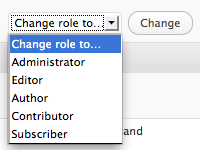
    • Administrator – ultimate control
    • Editor – Add, edit, delete, approve all content
    • Author – Add, edit, delete their content only
    • Contributor – Write (Submit for Review), edit, delete their own content
    • Subscriber – Read only
  • WordPress is Open Source.  Developers around the world submit professional-looking themes to the project, training materials are available online and through the codex, and the software is continually improved and distributed freely.
  • WordPress is Easy.  Admittedly, this is my personal opinion, but someone using WordPress does not need to know HTML, CSS, or PHP.  WordPress themes are built by Web developers who DO know all of those programming languages, so you benefit from their expertise without needing it yourself.
  • WordPress is Versatile.  With 1,221 free themes and 10,705 plugins to chose from, a Library can find the theme and side-bar widgets (plugins) that are right for their needs.  Pick a theme with a customizable header to showcase your unique photos. Choose a three-column theme enhanced with an Event Calendar, Bestseller RSS feeds, and social networking widgets, like Twitter or Facebook.